Website Content Ready Kit
The page a client fills in: copy, logos, owners, due dates, and the version that was approved. $19 beta, then $29.
For freelance web designers and small studios
Studio Ops 2.4. Workflows 00 through 16, plus 09a, from the inquiry form through handover. The email DNS check is included. The automation handover stays off until you turn it on. Import the JSON, fill one CONFIG node, and the emails and the sheet stay in step.
What's new in Studio Ops v2.4: handover can list the automations you delivered and ask the client to connect credentials on their own instance. That switch is off, so a web-only studio is unchanged. v2.3 still reads MX, SPF, DKIM, and DMARC without editing DNS.
The Billing pack is a separate folder. It sends milestone payment links, reminds on overdue invoices, and holds handover until the final invoice is paid.
$29 once. Tested on n8n 2.46.
01 — Who it is for
You need an n8n account, yours. n8n Cloud is enough. A self-hosted n8n works when its webhook URL is public.
02 — The workflows
The zip also includes 09a and the two shared workflows, 00 send email and 00 error notification. Every other file calls those. Each file has a CONFIG node. Slack steps are in the file. Leave Slack unconnected if you do not use it.
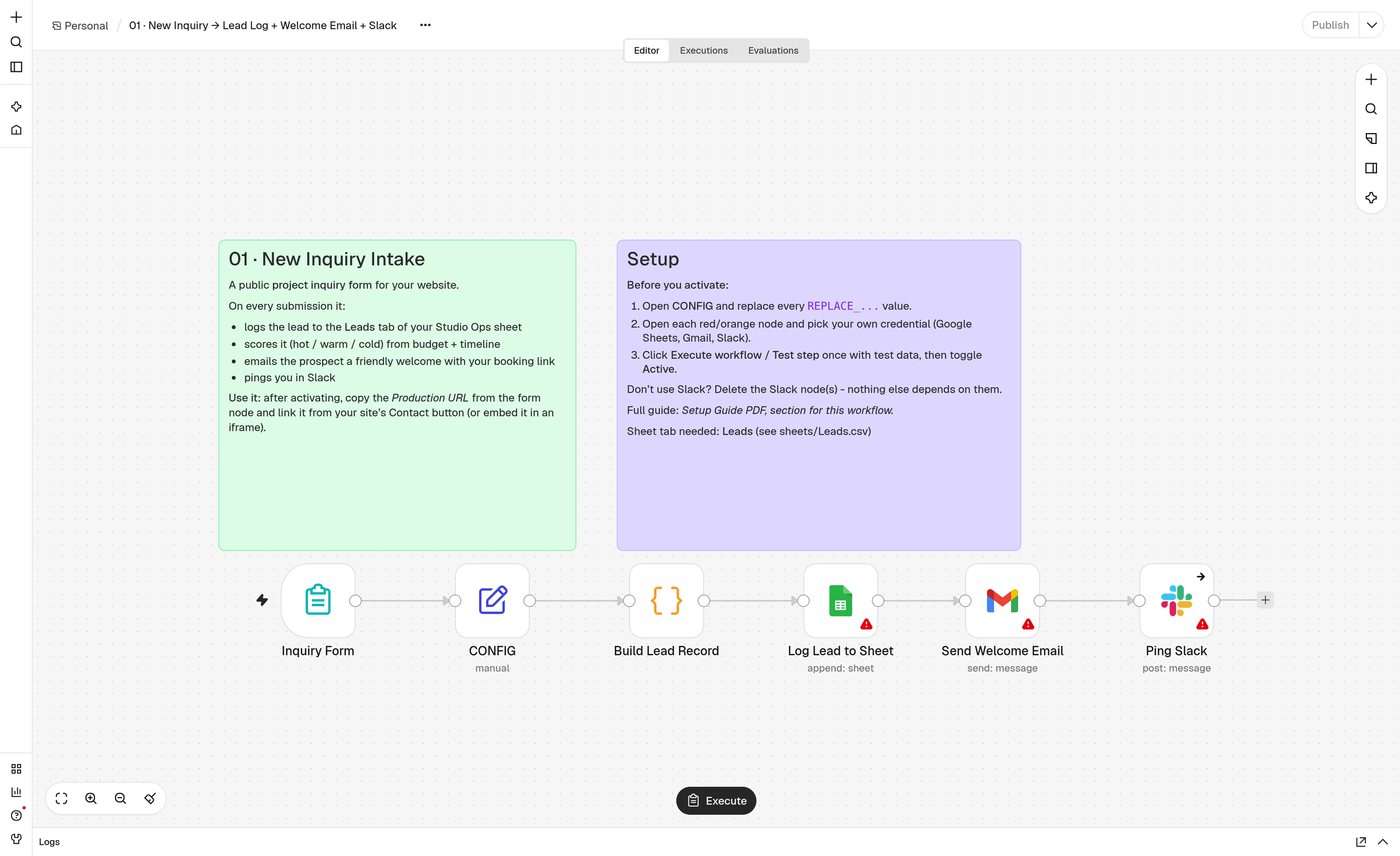
A form logs the lead, scores it Hot, Warm, or Cold, sends a welcome email with your booking link, and pings Slack.
When the deposit is in, it creates the client Drive folder from your template docs, shares it, adds the project row, and sends the kickoff email, a Slack note, and the standard asset list. Without a deposit, it sends a reminder.
Weekdays at 9:00, one email per client listing what is missing or overdue. The tone steps up. After the number of reminders you set, Slack is told and the row is marked Escalated.
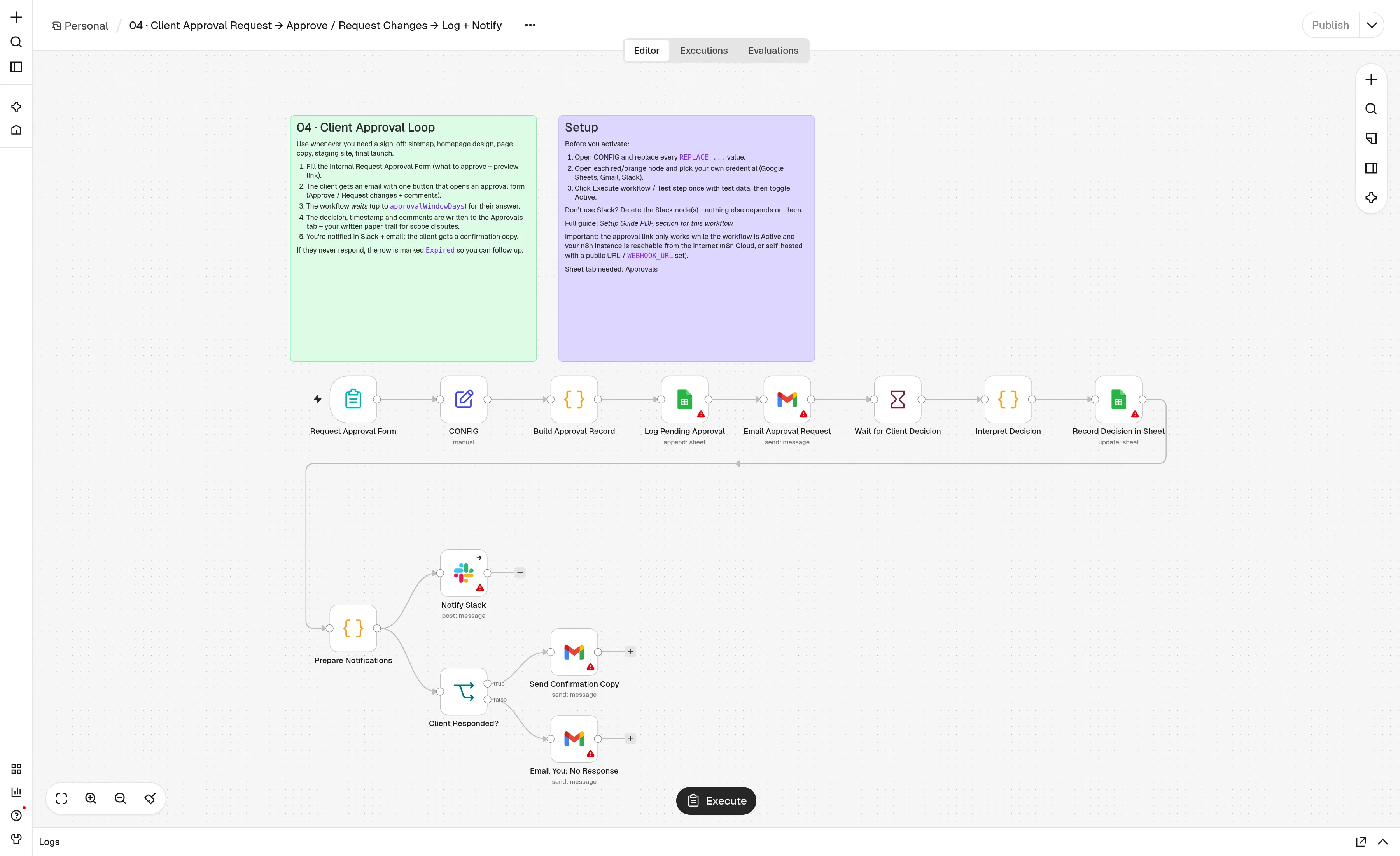
The client gets one Review & respond button, then an approve or request-changes form. It waits up to 14 days, logs the decision and the comments, and tells you. No answer, and the row is marked Expired.
The client submits the change and gets an acknowledgement. You fill a private estimate. The cost comes from your hourly rate. They accept or decline, and the answer is logged.
A daily note with the progress bar, what is blocked, overdue, or due soon, and the launch countdown. It goes out by email and Slack.
Friday, one email per active client. By default each one is saved as a Gmail draft, so you can read it before it sends.
The handover email offers a care plan. Seven days later, a testimonial form. A 4 or 5 star answer gets a request for a Google review. If the billing gate is on, the email waits until the final invoice is paid.
Day 3 and day 7 after a proposal is detected in sent mail, or marked by hand. Then the lead is Expired and Slack tells you. A reply stops it. A paid discovery invoice is optional and off.
If files or an approval sit for five business days, the client gets one pause note and the date moves. Five more quiet days mark the project On Hold. It resumes when they deliver. Payment pauses stay Paused.
Toggl, Clockify, Harvest, or a generic time webhook. Friday, Slack once at 50% and 80% of budgeted hours. The effective rate and the digest go to you only.
Day 3 a testimonial, day 7 a care plan, day 30 a referral. Each one waits in Slack until you press Send. A 4 or 5 star note you may publish is sent to you.
A welcome questionnaire and a checklist. Missing items get a reminder at 3 and 6 business days. Day 9 tells you, and can move the launch date if you turn that on.
Monday, clients whose last project ended 6 to 12 months ago. A check-in draft, then Send, Skip, or Snooze. Five a week. No Stripe.
On handover, a DNS read of MX, SPF, DMARC, and common DKIM selectors. Slack says pass or missing. The handover doc can get the same note. DNS is not edited.
Off unless handover asks for it. The client confirms each credential is connected. No passwords. Reminders wait for Send in Slack.
03 — The zip
One download. The guide is also linked on its own, on the page you reach after checkout.
Workflows 01 to 16, plus 09a and the shared send-email and error workflows. Import the ones you want. Each has a CONFIG node for your own links, rates, and sheet.
A template with the project tabs, including time entries, plus the CSVs, so the workflows have somewhere to write.
Credentials, the CONFIG node, and the order to turn the workflows on. Optional nodes ship disabled.
04 — Requirements
No server on this site. The workflows run where your n8n already runs.
Clients open a form and an approval link. n8n Cloud gives you that URL. A self-hosted n8n needs a public webhook URL.
The sheet, the Drive folder, and the mail all use your Google account. You connect those credentials in n8n.
Optional. A workflow still imports if you leave the Slack node unconnected.
That is the version these JSON files were checked on. The setup guide names it.
05 — Questions
It was tested on n8n 2.46. That is the version the JSON was checked against. An older n8n can refuse a node it does not have. If an import fails, use 2.46 or a newer 2.x release. The setup guide names the version.
No. Import the JSON, open the CONFIG node, and fill your booking link, your hourly rate, and the sheet. Then connect Google, Gmail, and Slack if you want the pings, and activate the workflow. The setup guide walks through those credentials.
Yes. $29 once. Updates to this pack are included. This site does not bill you monthly for the workflows. n8n Cloud, if you use it, is billed by n8n.
One freelancer, or one small studio, on that studio’s own client work. You may not resell the JSON, the sheet, or the guide, and you may not give the blank pack to another studio. Updates to this pack are included. Read the terms.
Beta purchases include a 14-day, no-questions-asked refund. The refund steps are on the policy page. Refund policy.
06 — Pricing
$29 once. Use the workflows on every client this studio takes. Version 1 updates are included.
One-time price: $29
Single-studio license. One freelancer or one small studio may use the files on its own client work. You may not resell the pack or give the blank files to another studio. Updates to version 1 are included. The full wording is in the terms.
Beta purchases include a 14-day, no-questions-asked refund. The refund steps are on the policy page. Refund policy.
The other kits
This pack sends the email and writes the row. The documents and the page the client fills in sit beside it. The maintenance pack is the same studio after the site is live.
The page a client fills in: copy, logos, owners, due dates, and the version that was approved. $19 beta, then $29.
Proposal, scope, agreement, kickoff, change requests, launch, and handover, in Google Docs. $19 founding, then $29.
Maintenance 1.2.0, M01 through M06: monitoring, tickets, a monthly report, renewals, and workflow health. $29 once.
The content, paperwork, automation, and skills kits together are about $69. The maintenance pack is priced on its own. Bundle checkout is coming soon.