
You launched the site. The contact form works. Then the client says the newsletter went to spam, or the mailbox they have used for years stopped receiving mail the afternoon you changed nameservers. Those are different failures, and both show up in public DNS if you look before you celebrate.
You do not need to become the mail host. You need to read four kinds of records, write down what they mean in a sentence the client can forward, and not edit them from a checklist.
What each record is for
MX says where mail for the domain is delivered. If it is missing, there is no mailbox at that domain until someone publishes one. Pointing the website at a new host does not create an MX record, and it does not move an existing one. If the site moves and the mail host stays, the MX should still name the mail host.
SPF is a TXT record that starts with v=spf1. It lists who may send mail as that domain. A domain should have one SPF record. Two of them make both fail. The end of the record matters. ~all is a soft fail and is a normal setting while you are still adding senders. -all is strict. A record with no all is unfinished. The include for Google and the include for Microsoft are different. Copy the one the mailbox host documents. Do not stack both "just in case" unless both systems really send.
DKIM is a TXT record at a selector, a name like google._domainkey or selector1._domainkey. It publishes a key so receivers can check that the message was signed by someone who holds the matching private key. You will not see every possible selector. A check of the common names can pass when Google or Microsoft 365 is set up in the usual way, and it can warn when the host uses a custom selector name. A warn here means "these names were not published," not "mail is broken." Ask the host for the selector name. Do not invent a key in a spreadsheet.
DMARC is a TXT record on _dmarc. It tells receivers what to do when SPF or DKIM fails, and where to send reports. p=none watches and still delivers. That is a warn if your goal is enforcement, and it is the right first setting while you are collecting reports. p=quarantine and p=reject are stricter. Missing DMARC is a fail if you wanted a policy at all. A record without a p= is unfinished.
A report a client can forward
The useful output is not a wall of raw DNS. It is one line per record: pass, warn, or fail, then one sentence about what to do, then the record you saw.
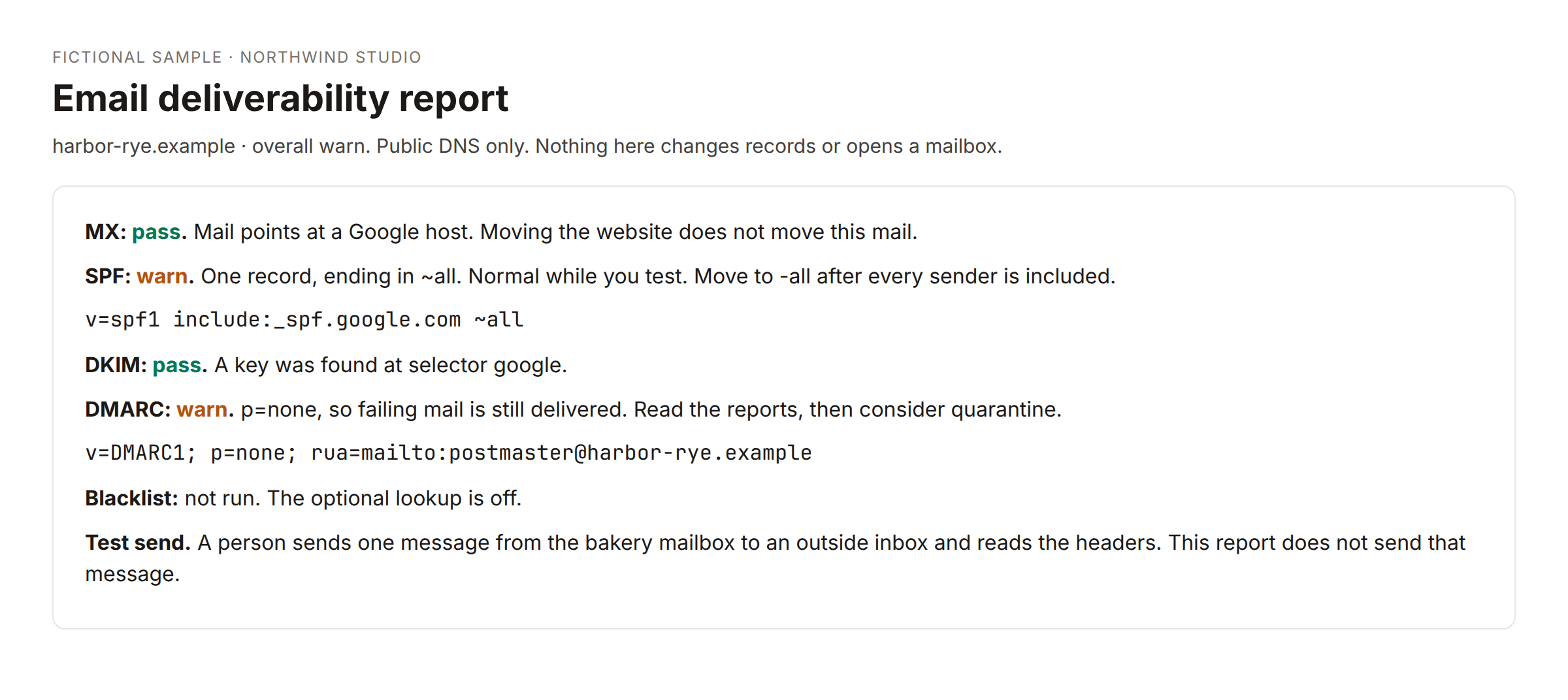
In that sample, MX and DKIM pass, SPF warns because it still ends in ~all, and DMARC warns because it is p=none. The overall result is warn. Nobody is told to panic, and nobody is told the workflow changed the DNS. It did not. A public read cannot add a TXT record, and it should not try.
Blacklist lookups are optional. If you turn one on, you are asking whether an address showed up on a list such as Spamhaus. The workflow still should not remove the listing. If the lookup is off, say it was not run. Do not leave a blank that looks like a pass.
The test send is a person
DNS can look fine and the mail can still land in spam, or the reverse, for a day, while caches and a new signature settle. The last step is a real message from the client mailbox to an outside inbox you control. Open the headers. You want SPF pass, DKIM pass, and DMARC pass on that message.
Do not cancel the old mailbox until that test arrives. Do not create a new Google Workspace or Microsoft 365 tenant from the checklist. If they need a mailbox and they do not have one, that is a product decision and a bill, not a side effect of launch.
Write the test steps in the report so the client sees them. The workflow should not send the probe for them. A probe sent from your studio address proves nothing about their mailbox.
When to run it
Run it before you change nameservers, and again after. The before run is the inventory. The after run tells you whether MX and the TXT records survived. If the handover doc has a place for the DNS inventory, paste the report there. If the doc link is not a document you can append to, leave the append step off and keep the report in the sheet and in a draft email you forward yourself.
Selectors worth checking on a typical small-business domain are google, selector1, selector2, and default. Add another name when the host tells you theirs. Do not add twenty guesses.
What you say in the handover
One paragraph is enough in the email: where the mailbox lives, that MX SPF DKIM and DMARC were read, and that moving the website is not the same as moving mail. The longer report is the attachment or the end of the doc. Include who will change the record if something failed. If the client holds the registrar login, the fix sentence should say "add this at the registrar," not "I will log in tonight" unless that login is actually yours.
Write the fix so someone else can do it
When a record fails, the sentence should name the host where the edit happens and the record to add, in words. "Add a TXT on _dmarc with v=DMARC1; p=none; rua=mailto:you@theirdomain" is something a client can hand to the person who holds the login. "DMARC is misconfigured" is not. You still do not log in unless that account is yours.
If SPF warns because a new tool sends mail, the include for that tool belongs in the one SPF record, not in a second TXT. Say that. People add a second record because the panel makes a new row by default.
Keep a copy of the passing report in the project folder. The next launch, or the next "mail broke" call, starts from that copy instead of from memory.
A smaller version and the studio version
You can do this by hand in the DNS panel once. The point of a workflow is to do the same four reads on every launch and store the words. The studio workflow that reads DNS over HTTPS and writes pass, warn, or fail is that job. It can draft an email and it can append to a doc when you enable those steps. Both ship off until you connect the credential, because a launch checklist should not demand a Gmail login to tell you the MX is missing.
There is no separate product here for "we will warm up your domain" or "we will open the mailbox." If a client needs that, it is a different engagement. Your job at launch is to notice the missing record before their accountant does.
Community version
I used to treat email DNS as the client's mail person's problem until a launch moved nameservers and the MX did not come with it.
What I check now, read-only: MX, one SPF, DKIM at the usual selector names, and DMARC. Pass, warn, or fail, plus one sentence. Two SPF records is a fail. ~all is a warn, not a crime. p=none is a warn if they think they are enforcing. A missing common DKIM selector is a warn until we know the real selector name.
I do not edit the records from the checklist, and I do not open a mailbox. The last step is a human test send from their mailbox to mine, then I read the headers. The old mailbox stays until that message arrives.
The report is something I can forward. A raw dig is not. I run it before and after the nameserver change. The second run is the one that has saved me.
When something fails I name the record and where to add it, so the client can hand that sentence to whoever holds the login. I do not log in for them. A second SPF row is the mistake I now say out loud, because the panel makes a new TXT look harmless.