
Launch day is two lists. One is the site itself: words, forms, the certificate, the redirects. The other is ownership: who can log in after you are gone, who pays the renewal, and where the DNS notes live. Designers mix those lists and then discover, in month six, that the domain auto-renew was on their own card.
Keep the lists separate. Tick the site before you switch DNS. Tick the ownership list in the handover document the same day, while the details are still in front of you.
Before the switch
Walk the pages yourself. Alt text on meaningful images. Contrast on text and buttons. A keyboard pass with a visible focus style and no trap. Form labels, and errors next to the field. One H1 and a heading order that is not using headings as font sizes.
Save one Lighthouse or PageSpeed run and write the target you actually agreed. "90 on the homepage" is a target only if you said it. If you did not agree a number, write the scores down and do not pretend there was a gate. Image dimensions, lazy-load below the fold, a short list of font files, and caching for static files belong on that same pass. Core Web Vitals from the run are a note: LCP, INP, CLS. They do not block launch by themselves unless your contract says they do.
Then the unglamorous technical rows. HTTPS, and http goes to https. One host for www and the bare domain. Old URLs redirect. Each form delivered a test to the right inbox. Spam protection is on. A backup exists and you opened it once. Staging passwords and noindex are off on the live site. Analytics will be checked after the tags are published, not assumed because the snippet is in the repo.
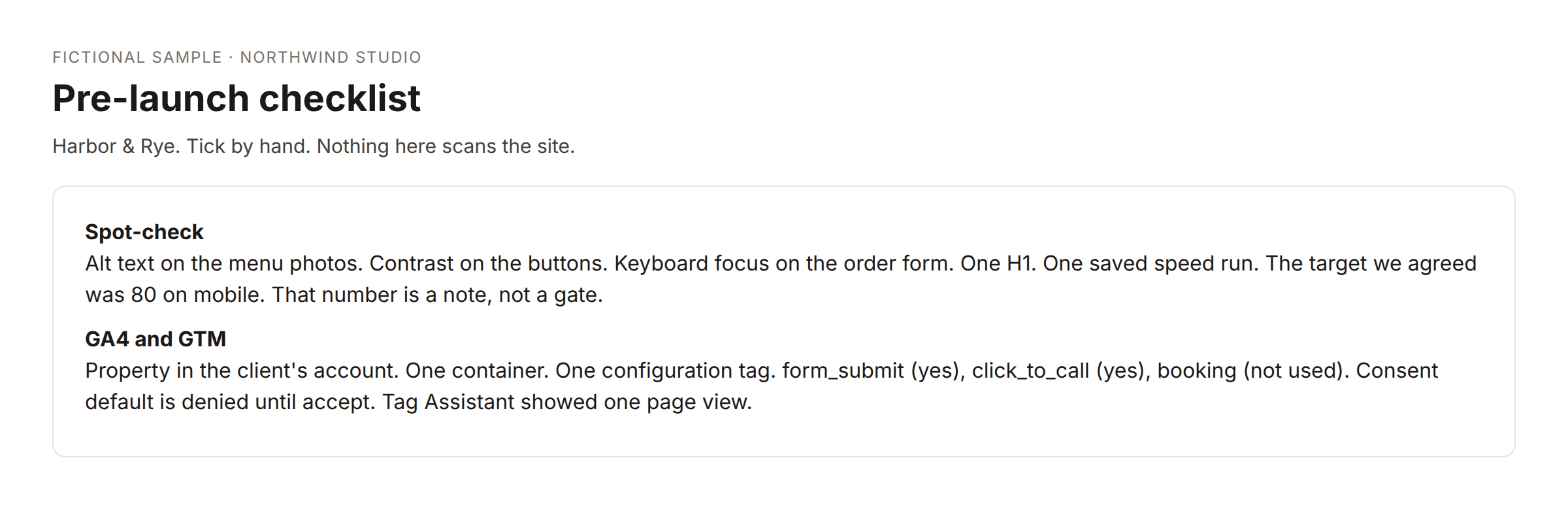
The excerpt is a fictional bakery. Use it as a shape. Do not copy the blank measurement ids onto a real site and call them done.
None of this needs a scanner that fails the build. A person looking, with the list in a sheet, is enough. A daily email that shows what is still "to do" is useful in the last week. It does not replace the looking.
The handover document
The handover is what the client keeps. Do not put passwords in it. Name the account, the owner, and the URL where they sign in.
Then a domain section, still as ticks:
- Who can log in at the registrar after today.
- The renewal date, and whether auto-renew is on.
- A written inventory of A, CNAME, MX, and TXT, including SPF, DKIM, and DMARC.
- The nameservers, and the CDN if one sits in front of the site.
- Who issues the certificate and whether it renews on its own.
- The hosting plan, the renewal, and whose card is billed.
- Where backups are stored, and that one restore was tried.
- The migration steps you actually used, and how to roll back if the new host is wrong.
- Who pays for the domain, DNS, CDN, and hosting after today.
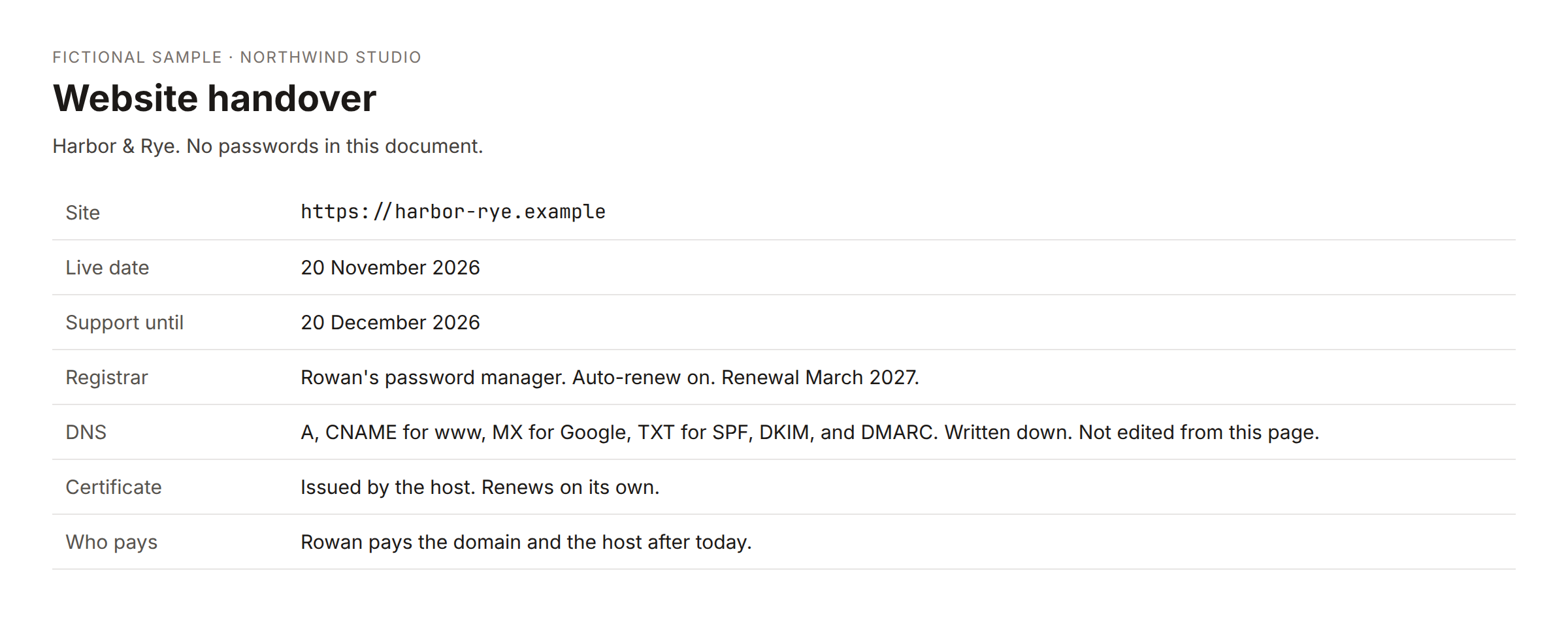
Moving the website does not move the mailbox. The MX records are part of the inventory so nobody cancels the old mail host because the site has a new A record.
If you also hand over automations, list the name, what starts it, which instance it runs on, and who to call. Credentials stay with the client. They create the account or reconnect it. You do not email a password or an API key.
Analytics on the same day
"Analytics is installed" is not a step. The steps are a GA4 property in the client's name, a web data stream for the live URL, one tag manager container, a configuration tag, the events you really have, a consent decision, and one check in Tag Assistant or DebugView.
After publish, a read-only check of the homepage HTML can tell you whether a G- id or a GTM- container is present, whether a second id snuck in, and whether a consent-mode hint is in the page. It cannot see a tag that was never published, and it cannot see inside an unpublished container. Use it as a spot check after you think you are done, not as the installation.
Who gets the email
On launch day the client should get one handover note: live URL, link to the pack, support end date, and the pointer at the domain list. If you are waiting on the final invoice, send the preview first and the pack after payment. Do not attach the originals "just this once" because the list was unfinished. Finish the list, or say which rows are still open and who owns them.
A support window is a date. Bug fixes until that date. New pages are a new quote. A care plan, if you offer one, is a separate agreement with its own hours.
DNS day, written as a sequence
Do the inventory the day before you change anything. Export or copy the records you care about into the handover, not into a chat message. Then change the records you meant to change. Then read them back.
If mail stays at the old host, the MX and the mail TXT records should be identical before and after. If they are not, stop and put them back before you tell the client the site is live. A pretty homepage with no mail is not a launch.
Write who will notice the next renewal. If auto-renew is on and the card is the client's, say that. If auto-renew is off, put the date on a reminder you will actually see, and say who pays. "The domain is fine" is not a handover line.
Make the list survive the next project
If the checklist lives in a sheet, new projects should start from the starter rows, not from a copy of last client's half-finished ticks. When you add rows later, append them. Do not replace rows someone has already marked done.
The handover email can include the domain ticks as a short list, and the long form can live in the doc. The email is not a login to the registrar. It does not change records.
Keep a copy of the finished checklist with the project, not only in the tool you used to send mail. Six months later the question will be who pays the renewal, and the answer should be a tick, not a memory.
Support until a date, then a care plan only if they want one. Do not let the launch email quietly become a retainer. If they want watching, that is a separate page with hours and a monthly note. If they do not, the handover is the end of the build, and the list above is how you leave cleanly.
Community version
My launch list used to be "click around and then send the Drive link." The failures were boring: the domain renewed on my card, the mailbox MX got left behind, analytics was a tag in the repo that was never published.
I split it. Before DNS, I tick content, a manual accessibility pass, one saved speed run with the target we actually agreed, forms, redirects, and a backup I opened. The handover doc, with no passwords, ticks registrar owner, auto-renew, the DNS inventory including SPF DKIM and DMARC, nameservers, the certificate, who pays the host, where backups are, and how to roll back.
Analytics is its own short list: property, one container, configuration tag, only the events the site has, consent, then Tag Assistant. A read of the HTML afterward tells me if a second container appeared. It does not install anything.
If the final invoice is open, they get the preview. The pack goes after it is paid. I would rather delay the folder than explain a missing login in June.
I copy the DNS I care about the day before I touch it, then I read it back after. MX and the mail TXT records should match if mail did not move. Auto-renew and whose card it is go in the doc. "The domain is fine" is not a line I use anymore.